
Artificial intelligence has advanced faster in the last two years than in the previous decade. And in 2025, one innovation stands out above all else: AI Agents. These autonomous digital helpers can plan, execute, and refine tasks without needing constant human instructions.
Whether you’re a student, freelancer, business owner, or someone who simply wants life to feel a little more organized, AI agents can save hours every week and streamline almost anything you do online.
This guide breaks everything down from scratch, what AI agents are, how they work, what tools you can use, and how to build your first agent using simple steps. No technical background required.
What Are AI Agents?
AI agents are software systems that can understand goals, make decisions, and perform tasks on your behalf, often without needing you to manually guide every step.
Think of them as digital assistants that go beyond answering questions. They can:
- Plan a workflow
- Execute multi-step tasks
- Use external tools or apps
- Learn from results
- Improve their actions over time
AI Agents vs Normal AI Chatbots
| Feature | AI Agents | Normal AI Chatbots |
| Autonomy | Can act independently | Only responds when asked |
| Workflow | Handles multi-step tasks | Usually single-response |
| Tools | Can use apps, APIs, and browsers | Basic or limited actions |
| Complexity | Higher | Lower |
In simple terms: ChatGPT answers. AI Agents take action.
How AI Agents Work
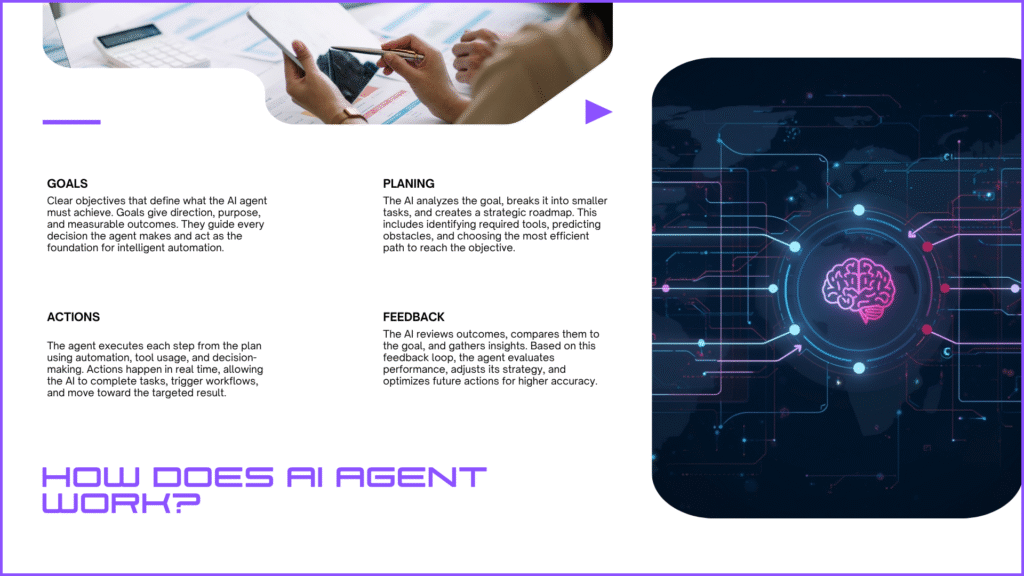
AI agents work through four main components:
1. Goal
You tell the agent what outcome you want.
Example: “Organize my weekly schedule.”
2. Plan
The agent breaks that goal into steps.
Example: Fetch calendar → Analyze free time → Suggest slots → Create schedule.
3. Action
It performs tasks using tools, browser actions, or integrations.
4. Feedback Loop
It checks its work, corrects errors, and refines results.
This is why agents feel more like teammates than tools. For readers who want to understand the deeper technology behind how agents learn and make decisions, here’s a complete beginner-friendly guide on deep machine learning.
Benefits of Using AI Agents
AI agents are becoming popular because they remove repetitive work and help you focus on the tasks that actually matter. Some of the biggest advantages include:
- Time savings: by automating multi-step workflows
- Error reduction: in tasks like research and data handling
- Consistency: in daily routines and business operations
- Better productivity: for individuals and teams
- Cost efficiency: no need for multiple apps or virtual assistants
Quick Comparison: AI Agents vs ChatGPT vs Traditional Automation
| Feature | AI Agents | ChatGPT | Traditional Automation |
| Autonomy | High | Low | Medium |
| Learning ability | Strong | Strong | Limited |
| Flexibility | Very flexible | Flexible | Rigid |
| Real-world use | Broad | Moderate | Narrow |
Popular AI Agent Tools
You don’t need to be a developer to use AI agents. These beginner-friendly platforms make it easy:
- OpenAI Assistants: Perfect for custom workflows, research, writing, and personal organization.
- Google Gemini Agents: Great for daily tasks, email automation, and document-based actions.
- AutoGPT & Agentic Frameworks: More advanced but extremely powerful for complex workflows.
- Taskade AI Agents: Visual interface for team collaboration and automated project management.
- Reworked Agent (Browser Automation): Best for scraping, automating websites, and performing online tasks.
- Microsoft Copilot Studio: Ideal for business users who need enterprise-level automation.
Each tool has its own strengths, but all will help beginners get started quickly. If you’re curious about how personal AI helpers differ from agent-based systems, you can also explore the best AI personal assistants in 2026, which focus more on everyday productivity and conversational support.
What You Can Do With AI Agents

AI agents can assist you across almost every area of personal and professional life. Here are some real examples people use daily:
- Research automation: Summarizing topics, analyzing competitors, gathering data
- Content creation: Drafting, refining, designing, planning
- Social media management: Scheduling posts, generating captions, analyzing engagement
- Customer support: Replying to tickets, writing responses, organizing feedback
- Business automation: Lead management, CRM updates, email sequences
- E-commerce workflow: Inventory tracking, price monitoring, product descriptions
- Tech tasks: Debugging code, generating scripts, testing software
Once you see how much work they can handle, it’s hard to imagine going back.
Step-by-Step Guide: How to Use AI Agents
Here’s the part most beginners struggle with. The good news? It’s not complicated.
Step 1: Define Your Goal
Decide what you want the agent to achieve.
Example: “Research three competitors and create a comparison sheet.”
Step 2: Choose an AI Agent Tool
Pick a platform based on what you need:
- Productivity → OpenAI Assistant
- Business automation → Copilot Studio
- Research & writing → Gemini or OpenAI
- Browser actions → Reworked Agent
Step 3: Set Up the Agent
Most platforms require simple inputs like:
- Instructions
- Rules
- Tone
- Preferences
- Steps to follow
You can start with a basic instruction set and expand it later.
Step 4: Add Tools or Integrations
This is where the agent becomes truly powerful.
You can connect:
- Google Sheets
- Email account
- APIs
- Browsers
- Databases
- Project tools
Step 5: Test the Agent
Start with a small task.
Ensure it understands your instructions and produces the type of output you want.
Step 6: Optimize & Improve
Refine instructions, add clarifications, adjust workflows, or teach better patterns.
This part turns a basic agent into something genuinely useful.
Common Mistakes Beginners Make
Most issues come from unclear instructions or unrealistic expectations. Here are the top mistakes to avoid:
- Giving the agent too many tasks at once
- Writing vague instructions
- Not testing workflows before automating
- Choosing tools that are too advanced for beginners
- Expecting perfect accuracy
Start small, then unlock more complex features as you become comfortable.
Advanced Features You Can Explore Later
Once you’re familiar with basic AI agents, you can try:
- Multi-agent collaboration
- API automations
- Browser tasks
- Personalized memory
- Dynamic workflows
- Custom knowledge bases
These turn AI agents into full digital employees.
Limitations of AI Agents
Even in 2025, AI agents are powerful but not flawless. They can:
- Misinterpret an unclear task
- Make mistakes in complex data handling
- Require human supervision
- Face restrictions with private or sensitive data
They’re tools, not human replacements.
AI agents aren’t just another tech trend; they’re the next big shift in how we work and manage digital life. Whether you want to automate repetitive tasks, improve productivity, or simplify your daily routine, starting with a single agent can change the way you work in just a few days.
If you’re ready to explore AI automation, start small, experiment with tools, and create workflows that fit your life or business. The sooner you begin, the faster you’ll experience the real value of AI.
Frequently Asked Questions (FAQs)
Are AI agents hard to use?
No. Most tools today are designed for beginners with no technical experience.
Do I need coding to use AI agents?
Not for basic setups. Advanced features may require simple scripts.
Are AI agents safe?
Yes, but avoid sharing sensitive data unless the platform provides secure handling.
What is the best AI agent tool for beginners?
OpenAI Assistants, Gemini Agents, or Taskade AI, depending on your goals.
Can AI agents replace human jobs?
They replace repetitive tasks, not human creativity or decision-making.